mansion Mobile App
We at mansion offer Android, iOS browser, and web-based access to our live-dealer tables, sportsbook, and slot games—each optimised for low-bandwidth streaming and fast table loading on mobile devices. Mobile-first design means you can place bets, monitor Liga 1 and Piala AFF markets, and join live blackjack or roulette studios from anywhere your local law permits access.

- Update
- StartFirst Game
- and
Our mobile experience prioritizes speed and security. The mansion app for Android downloads via direct APK; iOS users access the web app through their browser without App Store friction. Both paths support DANA, e-wallet, mobile banking, local payment, online payment, e-wallet, and direct bank transfers (mobile banking, local payment, online payment, e-wallet). Your account, transaction history, and KYC verification status sync instantly across devices.
Installation is straightforward—no hidden steps, no external dependencies. We guide you from download to first deposit in under five minutes. If you encounter certificate warnings or permission prompts, we explain why they appear and how to proceed safely.
How to get the mansion app
We offer three ways to access mansion on mobile:
Android APK
Direct download; install from unknown sources (one-time device setting). Works on Android 7 and above.
Download APKiOS Browser
Open Safari on iPhone or iPad; visit mansion.bid. Add to home screen for app-like experience.
Open in SafariWeb Browser
Use any browser on desktop, tablet, or phone. Responsive design adapts to all screen sizes.
Open Web AppInstallation steps for Android APK
- Download the APK: From this page, tap "Download APK" and wait for the file to save to your device.
- Enable unknown sources: Go to Settings → Security → Unknown Sources and toggle on (one-time setup).
- Install the APK: Open your file manager, find the mansion APK, and tap to install.
- Launch and register: Open the mansion app, create an account with email, phone, and password, then complete KYC verification with your government ID and proof of address.
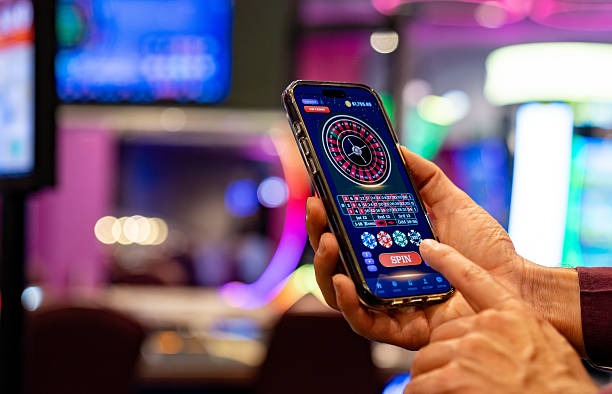
App vs. browser: which is better?
We designed the mansion app and browser experience to offer the same games and payment methods. The Android app stores offline cache, meaning live-table videos load faster on slower connections; the app also sends push notifications for upcoming Liga 1 matches and special offers. Browser access (web or iOS Safari) avoids installation friction and receives automatic updates without manual downloads. Choose based on convenience—both paths keep your account, balance, and transaction history in sync. Many users install the app at home and use the browser on their commute to Jakarta, Surabaya, or Bandung.
Quick comparison
- Android app: Faster video load, offline cache, push notifications, direct APK download
- iOS browser: No App Store review, instant access, add to home screen for icon
- Web browser: All devices, automatic updates, no installation required
Device compatibility
The mansion app requires Android 7 (API level 24) or higher. If your phone runs Android 6 or older, use the web browser instead—all features work equally well. For iOS, we support Safari on iOS 12 and later; older devices should also use the web browser. Tablets (both Android and iPad) work perfectly with the app or browser. We do not limit installation to specific device models, regions, or manufacturers.
Troubleshooting: unknown sources and certificate warnings
When you tap an unknown APK, Android shows a security warning. This is normal—our APK is signed with a valid developer certificate, but Google's Play Store approval process can be slow. We host the APK directly so you get the latest version immediately. If you see "Certificate not trusted" or "Install blocked," verify you enabled unknown sources in Settings and that your system date and time are correct. Some phones also check for sufficient storage space; free at least 50 MB before installing. If the APK download stalls, clear your browser cache and try again.

Data, permissions, and account security
The mansion app requests permissions for internet (to connect to our servers), storage (to cache table videos), and phone state (to pause video if you receive a call). We do not request access to your contacts, location, camera, or microphone. All data you send to mansion—email, password, payment details, KYC documents—is encrypted via SSL 256-bit. Your password is hashed; we never store it in plain text. Two-factor authentication is available in account settings. If you lose your password, use the "Forgot password" link on the login screen; we send a reset link to your registered email. Your account and balance are tied to your email and username, not to any single device, so you can log in on multiple phones or tablets.
Payment options on the app
On mansion, you can deposit and withdraw via DANA, e-wallet, mobile banking, local payment, online payment, e-wallet, and bank transfers (mobile banking, local payment, online payment, e-wallet). After you complete KYC verification with your government ID and proof of address, withdrawal is enabled. Processing typically occurs during regional business hours; we do not guarantee specific timeframes. Your transaction history and balance updates appear instantly in the app. If a withdrawal does not arrive within the expected window, contact our support team via in-app chat or email.
Closing remarks
We at mansion built our mobile experience to be fast, secure, and accessible. Whether you choose the Android app, iOS browser, or web app, you access the same live-dealer tables, sportsbook markets (Liga 1, Piala Indonesia, Piala AFF, international football), and slot games. Installation takes minutes, and our support team is available if you have questions. Remember: our services are available only where local law permits. Users are responsible for verifying that access and use of mansion comply with the laws of their own jurisdiction.